Device Review
Trimui Smart Pro Review: The Widescreen Underdog
Full review of the Trimui Smart Pro. Its 4.96-inch widescreen, Allwinner A133P performance, and CrossMix OS community support — where it wins and where it disappoints.
Zürich, Switzerland
Published April 21, 2026
The Trimui Smart Pro arrived in late 2023 as something of an oddity in the budget retro handheld space: a widescreen Linux device targeting the GBA-through-PS1 crowd, at a price that undercuts most of the competition. At roughly $70 MSRP — and frequently on sale — it bets that a 4.96-inch 720p panel and dual analog sticks will pull buyers away from the 4:3 Anbernic H700 devices that dominate this tier.
That bet mostly pays off, with one significant asterisk: you will want CrossMix OS installed before you seriously use this thing. On CrossMix, the Smart Pro punches above its weight class. On stock firmware, it feels unfinished.
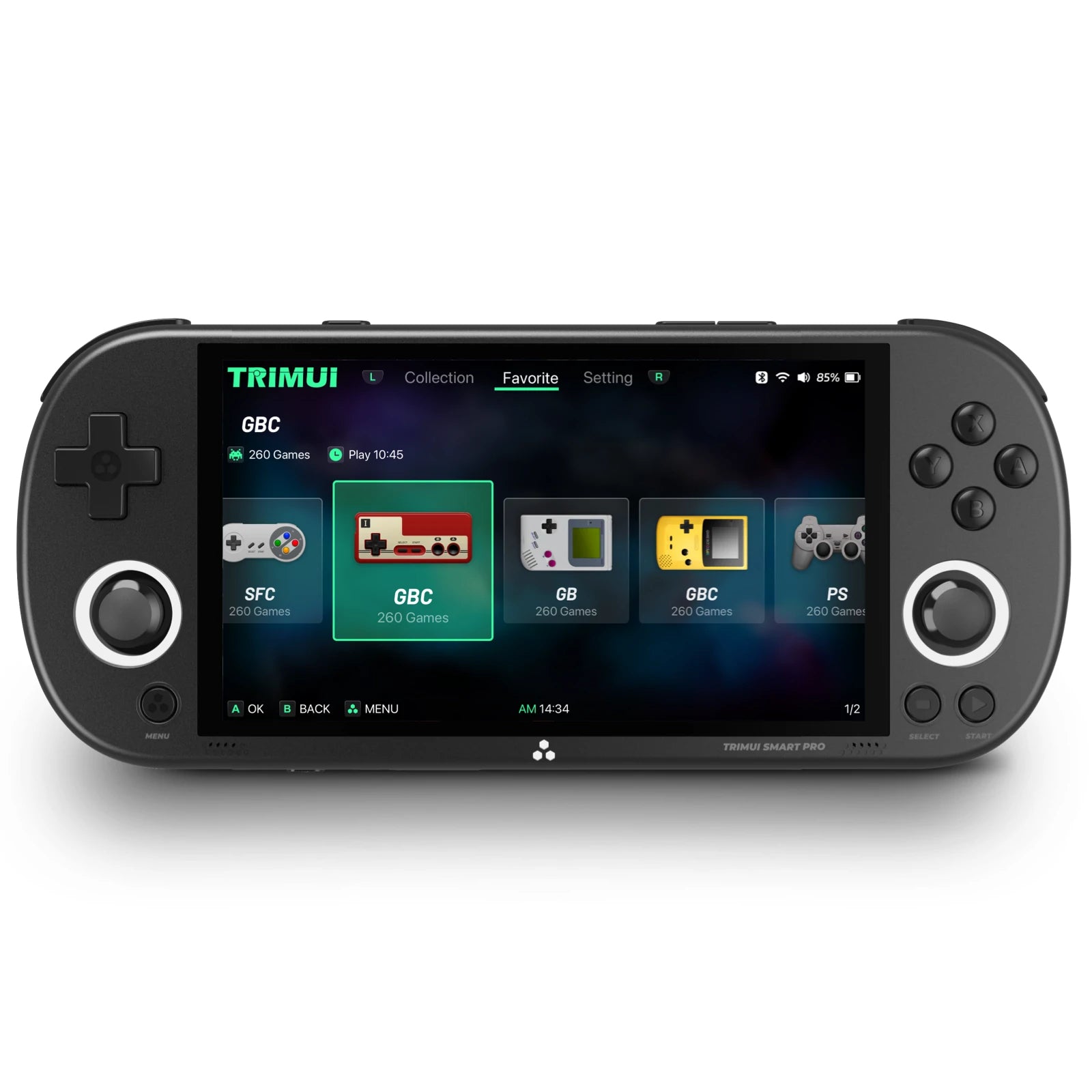
Trimui
Smart Pro
Image: Trimui
- Price
- $69.99
- Released
- 2023
- SoC
- Allwinner A133 Plus
- Screen
- 4.96-inch IPS 1280×720
Hardware and build quality
The Smart Pro has a PS Vita-like horizontal profile — wide, flat, and comfortable to hold for long sessions. It measures 188 × 80 × 17 mm and weighs 231 g, which sits at the heavier end for this class but distributes well across both hands. The form factor won’t feel alien to anyone who has used a modern gaming handheld.
Controls are full-featured: two analog sticks, a raised cross D-pad, ABXY face buttons, and a complete L1/R1/L2/R2 shoulder layout. That’s a meaningful step up from the no-analog-sticks Anbernic H700 budget line, and it matters enormously for N64 and PSP emulation where D-pad mapping compromises playability. The device also has vibration and RGB lighting around the analog sticks — neither is essential, but both work.
Connectivity is sensible: two USB-C ports (the top for OTG and controller input, the bottom for charging at 5V/1.5A), a headphone jack, WiFi 4, and Bluetooth. The absence of HDMI out is the one connectivity gap worth noting if you plan to use this on a TV.
Speaker placement is disputed between sources — some images show front-facing grilles, others suggest rear-mounted drivers. Until hands-on confirmation resolves this, treat “stereo 1W per channel” as established and speaker placement as uncertain. At 1W each, they’re louder than many competing devices.
Screen
The 4.96-inch fully laminated IPS panel at 1280×720 and 294 PPI is the device’s defining feature. There is nothing else at this price point with a laminated widescreen of this size. The lamination eliminates the air gap present in non-laminated budget panels and gives the screen a distinctly more premium feel.
The 16:9 aspect ratio is a double-edged sword. For platforms with widescreen hack support — GBA, PS1, N64, Dreamcast — it’s genuinely excellent, and these hacks are actively supported. For standard 4:3 retro content (NES, SNES, GBA without widescreen patches), you will see black bars. That’s the physics of putting 4:3 content on a 16:9 screen, and no firmware fixes it. If pixel-perfect 4:3 presentation is your priority, a 4:3 panel device is the correct choice. If widescreen-hacked GBA and PS1 are your primary targets, the Smart Pro’s screen is hard to argue against at this price.
The 60 Hz refresh rate is standard for this tier; no complaints.
Performance
The Allwinner A133 Plus (A133P) is a quad-core Cortex-A53 running at 1.8–2.0 GHz, paired with a PowerVR GE8300 GPU at 660 MHz and 1 GB LPDDR4X RAM. This is a step below the Allwinner H700 found in the Anbernic RG35XX family, which has more RAM headroom and a different GPU — the A133P trades raw throughput for a higher-resolution screen pipeline.
In practice, everything through PS1 runs flawlessly. N64 and Dreamcast land in “playable” territory, with lighter titles running well and heavier ones requiring tolerance for the occasional dropped frame. PSP is a similar story — lighter titles work, do not expect demanding 3D games to perform like they would on an Android device.
Emulation performance — Trimui Smart Pro
- GBA — mGBAFull speed Perfect
- SNES — various coresFull speed Perfect
- PS1 — PCSX ReARMedFull speed Perfect
- N64 — Mupen64PlusPlayable Playable
- Dreamcast — FlycastPlayable Playable
- PSP — PPSSPPPlayable (lighter titles) Playable
N64 emulation benefits significantly from the Smart Pro having actual analog sticks. Games like Ocarina of Time and Mario 64 are genuinely playable in a way they simply are not on the stick-less RG35XX SP. Heavier N64 titles — GoldenEye, Perfect Dark — will stress the hardware, but that’s true across all A-class Linux handhelds.
Dreamcast widescreen hacks are supported and look particularly good on the 16:9 panel, which is a pleasant bonus.
Battery life
The Smart Pro carries a 5000 mAh battery. Trimui’s manufacturer claim is 5 hours. Measured real-world hours are not confirmed in verified sources, so treat the 5-hour figure as a manufacturer target rather than a guaranteed result. At 5000 mAh, the physical capacity is competitive — comparable or better than most devices in this class — and charging is via the USB-C bottom port.
Firmware and software
The stock OS is Linux-based (Trimui’s own). It works, but it has real limitations: no Android app support, no standalone emulators outside RetroArch/LibRetro, and a UX that feels rougher than what CrossMix delivers. Moonlight game streaming is preinstalled on stock, which is a useful feature if you have a gaming PC at home — the WiFi 4 connection handles it adequately.
CrossMix OS
CrossMix OS is the community firmware developed specifically for the Trimui Smart Pro — it does not run on any other device. It layers on top of the familiar Trimui stock interface rather than replacing it entirely, which makes the learning curve shorter than a full launcher replacement. Key additions include:
- PortMaster support — native Linux game ports (Stardew Valley, Celeste, DOOM, etc.)
- PSX Analog Detector — automatically selects the correct controller profile for each PS1 game based on analog stick support
- EmuCleaner — hides emulator menu entries that have no ROMs loaded, reducing clutter
- Built-in scraper — downloads boxart without needing a PC
- OTA updates — roughly 2 GB per update, delivered over WiFi
- RetroAchievements support
- Boot logo customization, theme ecosystem, bezel overlays
Installation is beginner-friendly: flash to microSD with balenaEtcher, estimated at around 30 minutes, and it’s reversible. If you already have CrossMix installed, OTA updates work without reflashing.
Knulli
Knulli — a Batocera fork created to accommodate the closed-source GPU drivers that Batocera’s GPL license couldn’t legally include — also supports the Trimui Smart Pro. It brings an EmulationStation-style interface, overclocking options, netplay, PortMaster, and OTA updates. If you prefer the Batocera/ES frontend experience over CrossMix’s stock-UI approach, Knulli is a legitimate alternative. It also enables ADB connectivity on the Smart Pro, which is useful for development or file transfer workflows.
Both CrossMix and Knulli are actively developed; neither is a dead project. Most of the Smart Pro community has converged on CrossMix as the default recommendation, but Knulli is worth trying if the ES interface appeals to you.
European buyer notes
Trimui does not have a meaningful EU distribution presence, so AliExpress or the specialist importers listed above are the realistic purchase routes. Delivery times from EU warehouses are typically faster than direct China shipping; check the warehouse origin before ordering if speed matters.
Pros and cons
Pros
- + 4.96-inch 1280×720 fully laminated IPS — the best screen at this price tier
- + Dual analog sticks open up N64, PSP, and twin-stick games that D-pad-only devices can't touch
- + CrossMix OS is mature, actively developed, and beginner-friendly to install
- + Widescreen hack support for GBA, PS1, N64, and Dreamcast suits the 16:9 panel well
- + 5000 mAh battery capacity is competitive in class
- + Stereo speakers at 1W each, vibration, and RGB — full feature set
- + Dual USB-C ports with OTG host support
- + Knulli support adds a second quality firmware option
Cons
- − Stock firmware is underwhelming — CrossMix is near-mandatory for a good experience
- − No HDMI out, so TV gaming is off the table
- − 4:3 retro content (NES, SNES, GBA without widescreen hacks) shows black bars on the 16:9 panel
- − N64, Dreamcast, and PSP performance is playable but not headroom-rich
- − Speaker placement is unconfirmed across sources — build consistency is uncertain
- − WiFi 4 only; WiFi 5/6 is available on competing Android devices at higher price points
- − No official EU warranty support
Verdict
The Trimui Smart Pro is the right choice for buyers who specifically want a widescreen panel in the sub-$70 Linux handheld bracket. The combination of a fully laminated 720p display, dual analog sticks, and solid PS1 performance with widescreen hack support is genuinely hard to match at this price. With CrossMix OS installed, it’s a complete, polished device that the stock firmware never quite managed to be.
The device falls short if you need HDMI output, if pixel-perfect 4:3 presentation matters to you, or if you’re hoping for PSP and Dreamcast performance that doesn’t require game-by-game qualification. Buyers who want proven 4:3 retro performance in a quality clamshell shell should look at the Anbernic RG35XX SP instead. But if the widescreen form factor and analog sticks match your library — and for many buyers, they will — the Smart Pro earns a genuine recommendation.