Device Review
Anbernic RG35XX SP Review: The Clamshell Done Right
Hands-on review of the Anbernic RG35XX SP clamshell handheld. Emulation benchmarks, custom firmware notes, and EU buyer guidance.
Zürich, Switzerland
Published April 21, 2026
Anbernic
RG35XX SP
Image: Anbernic
- Price
- $64.99
- Released
- 2024
- SoC
- Allwinner H700
- Screen
- 3.5-inch IPS 640×480
The RG35XX SP is Anbernic’s clamshell take on the GBA SP formula — same flip-open lid, same pocketable silhouette, same target audience. It launched in May 2024 into a crowded sub-$70 bracket and immediately became one of the most discussed devices in the RG35XX family. The Allwinner H700 inside is familiar territory if you’ve spent any time with Anbernic’s 2024 lineup, but the form factor is what sets this one apart.
If your emulation sweet spot is GBA through PS1, this machine earns its price without much argument. The lack of analog sticks keeps it out of contention for PSP or anything that requires a thumbstick, but for the platforms it’s designed around, the SP delivers with a screen worth looking at and a hinge mechanism that actually protects it.
Hardware and build quality
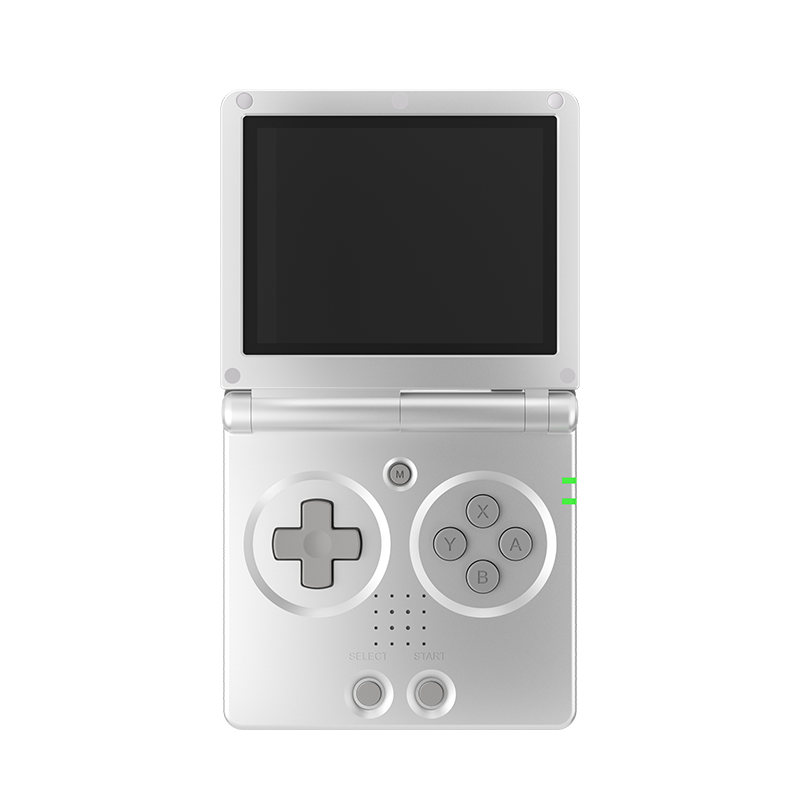
The SP weighs 192 g and measures 89 × 85 × 27 mm closed. That’s genuinely pocket-sized — it disappears into a jacket pocket without complaint, and the closed clamshell means the screen is protected during transit without a case. The hinge feels deliberate rather than fragile; it opens with a satisfying resistance and holds position without wobbling.
The D-pad is a raised crosspad that reviewers consistently describe as crisp — one of the better pads in this price range for 2D fighting games and platformers. The ABXY face buttons are tactile and well-spaced. The shoulder situation is less ideal: L1/R1 are tactile and usable, but L2/R2 are physically limited by the clamshell geometry. They’re present but the reduced surface area makes them harder to hit cleanly during fast inputs.
The speaker is mono. On a device this small there’s an engineering argument for it, but if you were hoping for stereo audio, this isn’t it — use headphones. There is a headphone jack, so that’s at least covered.
Connectivity includes 2.4/5 GHz Wi-Fi (802.11 a/b/g/n/ac) and Bluetooth 4.2, though per the manufacturer Bluetooth is listed for controllers only. The mini HDMI out is a genuine bonus for couch sessions. One important caveat: the USB-C port is charging only at 5V/1.5A per the manufacturer spec — don’t expect data transfer or OTG.
The dual microSD slots are properly useful. One card for the OS, one for games: a clean separation that makes firmware swapping easier and protects your ROM library if you experiment with multiple custom firmwares.
Screen
The 3.5-inch IPS panel runs at 640×480 with OCA full lamination. The lamination matters more than it sounds — on unlaminated panels you get a visible air gap between the glass and the display that catches reflections and slightly softens the image. Here the glass sits flush against the panel, and outdoor visibility is noticeably better as a result.
The 4:3 aspect ratio is the right choice for this device’s target library. GBA games render with small black bars due to their native 3:2 ratio, but PS1 titles fill the screen properly. SNES, GBC, and Game Boy content all sit at home on a 4:3 panel in a way they never will on a 16:9 handheld.
640×480 is the sweet spot for this class of device. It’s sharp enough that pixel art looks clean without the fuzziness of integer-scaled upscaling on a lower-res panel, and it doesn’t push the Allwinner H700 harder than necessary.
Performance
The Allwinner H700 is a quad-core ARM Cortex-A53 running at 1.5 GHz paired with a Mali-G31 MP2 GPU and 1 GB LPDDR4 RAM. This is a well-understood chip at this point — the same silicon powers the RG35XX Plus, RG35XX H, and related devices. Its emulation ceiling is firmly established by the community.
Emulation performance — Anbernic RG35XX SP
- GBA — mGBAFull speed Perfect
- PS1 — PCSX ReARMedFull speed Perfect
- Nintendo DS — DraStic / melonDSPlayable Playable
- N64 — Mupen64PlusPlayable Playable
- Dreamcast — FlycastPlayable Playable
- PSP — PPSSPPChoppy on heavier titles Choppy
GBA is flawless — every title in the library runs at full speed via mGBA, and the native 240×160 source material scales well onto the 640×480 panel. PS1 is equally solid; the full library is reported as full-speed through PCSX ReARMed, which is the standard core on Linux-based handhelds of this class.
N64 runs, but comes with two caveats. Performance is playable for most titles, and the community reports the device handles it reasonably — but the absence of analog sticks is a genuine problem for the platform. N64 was designed around thumbstick input, and mapping C-buttons to R2 on a device with compromised shoulder buttons creates a control compromise that goes beyond emulation performance.
Dreamcast via Flycast is in similar territory: lighter titles run well, and per retrohandhelds.gg the SP handles “up to DS, N64, and Dreamcast.” Expect to apply frameskip on the heavier end of the Dreamcast library (Shenmue, Sonic Adventure 2).
PSP is a different story. The H700 can push lighter PSP titles at 1x resolution, but the retrohandhelds review is blunt about it — it’s not a platform they’d recommend on this hardware. If PSP is a priority, you need a more powerful device.
Battery life
The battery is rated at 3300 mAh. The manufacturer claims up to 8 hours of runtime, though Anbernic’s published claims have historically been optimistic. Controlled timing tests from community reviewers weren’t completed at time of publication, so treat the 8-hour figure as a ceiling rather than a guarantee. In practice, expect performance to vary with screen brightness and the intensity of the emulated system — GBA will push further than Dreamcast.
The clamshell form factor means accidental button presses during transit aren’t draining the battery while the device is in your pocket, which is a small but practical advantage over open-face handhelds.
Firmware and software
The stock OS is Anbernic’s own 64-bit Linux launcher. It’s functional but unexciting — adequate for getting started, not the reason you’re buying this device.
The two custom firmware options worth installing are muOS and Knulli, both of which officially support the RG35XX SP.
muOS (MustardOS)
muOS is the most beginner-friendly option for Anbernic H700 devices and the one I’d point a newcomer toward. The RG35XX SP uses the BEANS build — distinct from the BANANA build used on the RG35XX Plus and RG35XX H, so make sure you download the right image. Installation is an SD card flash via balenaEtcher or Rufus, estimated at around 30 minutes, and it’s fully reversible by reflashing stock firmware.
muOS brings RetroArch integration, RetroAchievements support, overclocking, and an active theme ecosystem. The recommended two-card setup — OS on one microSD, games on the other — fits naturally with the SP’s dual-slot hardware.
Knulli
Knulli is a Batocera fork, created specifically because Batocera’s GPL license couldn’t legally accommodate the closed-source GPU drivers required on H700-class hardware. It uses an EmulationStation-style interface (familiar if you’ve used Batocera on other devices) and adds a meaningful differentiator: PortMaster support out of the box, enabling native Linux game ports including Stardew Valley, Celeste, and DOOM.
For the RG35XX SP specifically, Knulli added hinge support — closing the lid triggers sleep mode, which is the kind of QoL feature that makes the clamshell form factor genuinely usable rather than decorative. OTA updates via the Updates & Downloads menu are also present, which is convenient for staying current without reflashing.
Both firmwares support overclocking and netplay. The choice between them largely comes down to interface preference (muOS custom UI vs. EmulationStation) and whether PortMaster matters to you.
MinUI is also available as an unofficial option for those who prefer a stripped-down, minimal interface — but community support is thinner and it falls outside the two main recommended paths.
European buyer notes
The MSRP is USD 64.99, with sale pricing occasionally dropping to around USD 57.99. On AliExpress, typical EU pricing runs between €60 and €75 depending on shipping option and timing. The Anbernic direct store is also available as a purchasing option.
Warranty reality is worth acknowledging: Anbernic doesn’t have an EU service infrastructure. For defects-on-arrival, AliExpress buyer protection is your practical recourse, not a manufacturer warranty claim. The community consensus is that build quality on the SP is consistent enough that DOA units are uncommon, but it’s worth knowing before you order.
Pros and cons
Pros
- + Clamshell hinge protects the screen — no case needed for pocket carry
- + 3.5-inch IPS with OCA lamination is one of the better screens at this price
- + Dual microSD slots let you separate OS and game storage cleanly
- + GBA and PS1 emulation are flawless — the target platforms run perfectly
- + Mini HDMI out for TV connection
- + 2.4/5 GHz Wi-Fi and official muOS + Knulli support
- + Crisp D-pad well-suited to 2D games
Cons
- − No analog sticks — N64 and DS control mapping is a genuine compromise
- − L2/R2 surface area limited by clamshell geometry
- − Mono speaker only
- − USB-C is charging-only; no data transfer
- − PSP emulation is marginal — not a recommended use case on this hardware
- − Manufacturer battery claim of 8 hours unverified by controlled community testing
Verdict
The RG35XX SP gets the clamshell format right in a way that Anbernic’s earlier attempts at the form factor didn’t. The laminated 4:3 IPS screen, the hinge-triggered sleep in Knulli, the dual microSD slots, and the solid D-pad all combine into a package that feels considered rather than assembled from a parts bin. For GBA and PS1 — which together represent thousands of titles worth playing — this device is hard to fault at its price.
Where it falls short is clearly defined and won’t surprise anyone who reads the specs: no analog sticks, compromised shoulder buttons, and an H700 SoC that can’t make PSP a serious option. If your emulation ambitions sit firmly in the 16-bit and 32-bit era, those limitations won’t matter. If you need analog input or want to run PSP titles properly, look at something with sticks — the RG556 or a Retroid Pocket model are different devices for a different use case, and the SP isn’t trying to compete with them.