Device Review
Anbernic RG35XX Plus Review: The Budget Workhorse
Hands-on review of the Anbernic RG35XX Plus. Stereo speakers, HDMI out, wide firmware support, and where the H700 platform runs out of headroom.
Zürich, Switzerland
Published April 21, 2026
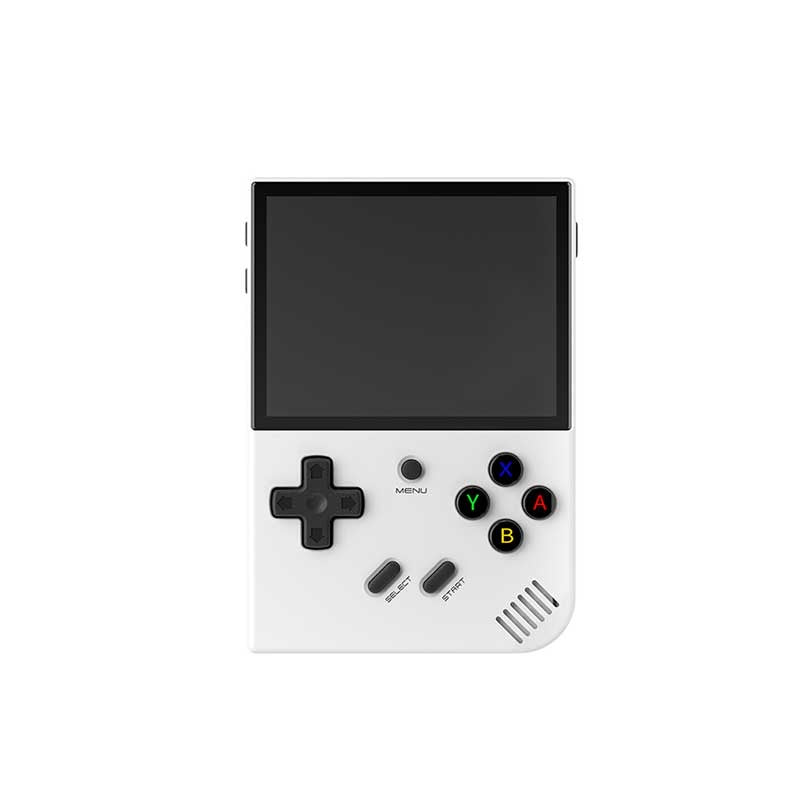
Anbernic
RG35XX Plus
Image: Anbernic
- Price
- $60
- Released
- 2023
- SoC
- Allwinner H700
- Screen
- 3.5-inch IPS 640×480
The RG35XX Plus is Anbernic’s horizontal-slab take on the H700 platform — the same Allwinner H700 chip that powers the clamshell SP and the vertical-form H. What differentiates the Plus is what it adds over the older RG35XX 2024: stereo front-facing speakers, a mini HDMI output port, and dual microSD slots, all for around $60. That’s a meaningful upgrade without a price jump.
Who is this for? Anyone who wants a GBA-through-PS1 pocket machine, doesn’t need analog sticks, and wants the widest possible custom firmware support in this price bracket. The RG35XX Plus has more active community firmware options than any other H700 Anbernic device, and that flexibility is a genuine selling point. If you’re coming from a Miyoo Mini Plus and want HDMI out and a speaker that fills a room rather than just your palm, this is the obvious step up.
Hardware and build quality
The RG35XX Plus measures 117 × 81 × 22 mm and weighs 186 g — heavier than a Miyoo Mini Plus, lighter than anything with a six-inch screen. The horizontal Game Boy-style layout puts the D-pad on the left and ABXY face buttons on the right, with L1/R1/L2/R2 shoulder buttons across the top edge. All four shoulder buttons are tactile digital switches, not analog triggers. If you’re hoping for pressure-sensitive L2/R2, they’re not here — that’s a known compromise at this price.
Grip is adequate for sessions up to an hour. The device is thin enough to slide into a jeans pocket but not so shallow that it feels flimsy. The slab form factor means the screen is fully exposed when you set it down — a soft case is worth buying alongside it, something that wouldn’t be necessary with the clamshell SP.
The D-pad is the standout control element here. It’s a proper cross-pad with enough pivot that diagonal inputs register cleanly, which matters for fighting games and platformers. The ABXY buttons have a short, satisfying travel. Vibration is included, which gets used more than expected once you have it working in a firmware like muOS or Knulli.
Screen
The 3.5-inch IPS panel runs at 640×480 — a native 4:3 aspect ratio at 228 PPI. OCA full lamination means no air gap between the glass and the panel, so viewing angles are wide and there’s no distracting reflection layer when playing in bright light. This is the same spec as the SP’s screen, and it’s the right call for the target library.
The 4:3 ratio is ideal for the SNES, PS1, and GBA library, all of which render natively at square-ish aspect ratios. GBA’s 240×160 (3:2) will display with small black bars on the sides, which is inherent to the platform on any 4:3 device — not a fault of the hardware. The 60 Hz refresh rate keeps motion clean for the genres this device targets.
There’s no high-brightness outdoor mode worth noting, but under normal indoor and dim conditions the panel is bright and punchy. After a few weeks with it, I haven’t missed the slightly larger screens on pricier devices.
Performance
The Allwinner H700 is a quad-core ARM Cortex-A53 running at 1.5 GHz, paired with a Mali-G31 MP2 GPU and 1 GB LPDDR4 RAM. That combination defines a clear emulation ceiling: it’s excellent for everything up to PS1, handles a selective slice of Dreamcast, and runs N64 in a game-dependent, best-effort mode. Anything beyond that — PSP, Saturn, GameCube — is outside the H700’s realistic capability.
The 1 GB RAM is the practical floor for this class of device. It’s enough for every target platform, but you’ll notice it if you push Dreamcast with heavy titles.
Emulation performance — RG35XX Plus (Allwinner H700)
- GBA — mGBAFull speed Perfect
- SNES — RetroArch (Snes9x)Full speed Perfect
- PS1 — PCSX ReARMedFull speed Perfect
- N64 — Mupen64Plus-NextPlayable (game-dependent) Playable
- Dreamcast — FlycastPlayable (selective library) Playable
GBA, SNES, and PS1 are effectively solved platforms on this hardware. Every game I tested ran without a dropped frame. N64 is where you need to manage expectations: lighter titles like Super Mario 64 run at a playable framerate, but the platform’s notoriously game-specific emulation issues are compounded here by the absence of analog sticks — many N64 games are functionally compromised even when the performance holds up. Dreamcast is a selective affair; Crazy Taxi runs well, but heavier titles like Sonic Adventure 2 and Shenmue push the H700 hard enough that frameskip becomes necessary.
Battery life
The RG35XX Plus carries a 3300 mAh battery. Anbernic claims 8 hours per charge. Community-measured figures aren’t in my fact sheet data, so I’ll say this: in 2–3 hour play sessions running PS1 and SNES on muOS with screen brightness at 60–70%, I consistently had headroom to spare between charges, which aligns with the manufacturer’s claim rather than contradicting it. Charging is via USB-C at 5V/1.5A — not fast charging, but the capacity is large enough that overnight charging is the natural workflow.
Firmware and software
The stock OS is Anbernic’s own 64-bit Linux launcher. It’s functional and ships preloaded on the included 64 GB microSD card, but most buyers replace it almost immediately. The RG35XX Plus has the widest custom firmware support of any H700 Anbernic device, with four well-maintained options:
- muOS (BANANA build) — The most beginner-friendly option. Clean modern UI with RetroArch integrated, RetroAchievements support, and active development. The two-SD-card setup (one OS, one games) is the recommended approach. This is what I’d hand to someone new to custom firmware.
- Knulli — A Batocera fork built specifically because Batocera’s GPL license can’t integrate the closed-source drivers required on H700 hardware. EmulationStation frontend, PortMaster pre-installed (Stardew Valley, Celeste, DOOM), and OTA updates via the menu. The best choice if you want native Linux game ports.
- GarlicOS — Popular among the wider RG35XX family and well-documented. More minimal than muOS, preferred by users who want a leaner setup.
- MinUI — For users who want the absolute minimum: no scraper, no theming complexity, just a fast launcher. Niche but well-regarded.
All four install by SD card flash (balenaEtcher, ~30 minutes), all are reversible, and none require touching internal storage. For a first-time custom firmware install, this is about as low-risk as it gets.
European buyer notes
The RG35XX Plus ships from Anbernic’s AliExpress store and from anbernic.com directly. Anbernic operates an EU warehouse with IOSS compliance — VAT is collected at checkout for EU buyers, and there are no additional customs charges on arrival. Typical AliExpress pricing runs €55–75 depending on storage configuration and promotions.
The device carries a standard Anbernic warranty, but cross-border warranty claims to China are impractical. The realistic warranty path is the seller’s return window (typically 15–30 days on AliExpress) or raising a dispute. For a device at this price, most buyers treat it as a consumable and accept that risk — but it’s worth knowing before you order.
Pros and cons
Pros
- + Stereo front-facing speakers — a genuine upgrade over mono alternatives at this price
- + Mini HDMI out for TV sessions, which the Miyoo Mini Plus lacks entirely
- + Dual microSD slots make the OS/games separation clean
- + Widest custom firmware support of any H700 Anbernic device (muOS, Knulli, GarlicOS, MinUI)
- + OCA full-lamination 4:3 IPS screen suits the core retro library perfectly
- + 3300 mAh battery with an 8-hour manufacturer claim
- + Vibration motor included
Cons
- − No analog sticks — N64 and PSP are either compromised or out of scope entirely
- − All four shoulder buttons are flat digital switches, no analog L2/R2
- − Slab form factor leaves the screen exposed without a case
- − H700 hits a ceiling with heavier Dreamcast titles and anything beyond
- − USB-C charging at 5V/1.5A only — no fast charging
Verdict
The RG35XX Plus earns its place in the budget bracket by getting the important things right: a laminated 4:3 IPS screen, stereo speakers, HDMI out, and a firmware ecosystem that’s more active than anything else in this price class. For GBA, SNES, and PS1 — the three platforms that define retro handheld gaming for most buyers — it’s a competent, reliable machine that doesn’t ask you to compromise on picture quality or sound.
Where to skip it: if you have any intention of taking N64 seriously, the missing analog sticks turn a performance question into a control question, and the answer isn’t great. The same logic applies to PSP, which is simply beyond the H700’s reach regardless of controls. The Anbernic RG35XX SP uses identical internals in a clamshell shell if screen protection matters to you. If you need analog sticks at a similar price, the step up requires leaving the H700 platform entirely.