Comparison
Miyoo Mini Plus vs Anbernic RG35XX Plus: Which Sub-$100 Handheld Wins?
Direct comparison of the Miyoo Mini Plus and Anbernic RG35XX Plus. Build, screen, emulation, custom firmware — which one should you buy?
Zürich, Switzerland
Published April 21, 2026
Both the Miyoo Mini Plus and the Anbernic RG35XX Plus sit in the same price bracket, target the same retro gaming sweet spot, and share a 3.5-inch 640×480 IPS screen. On paper they look almost identical. Under the hood — and in the hand — they’re aimed at meaningfully different buyers.
The short version: the RG35XX Plus is the better-equipped device, with a stronger SoC, more RAM, dual-band Wi-Fi, Bluetooth, HDMI output, and a full set of shoulder buttons. The Miyoo Mini Plus trades nearly all of that for a lighter, more pocketable body and the best D-pad in its class. If you’ve been searching “miyoo mini plus vs rg35xx plus” trying to settle this, here’s the honest breakdown.
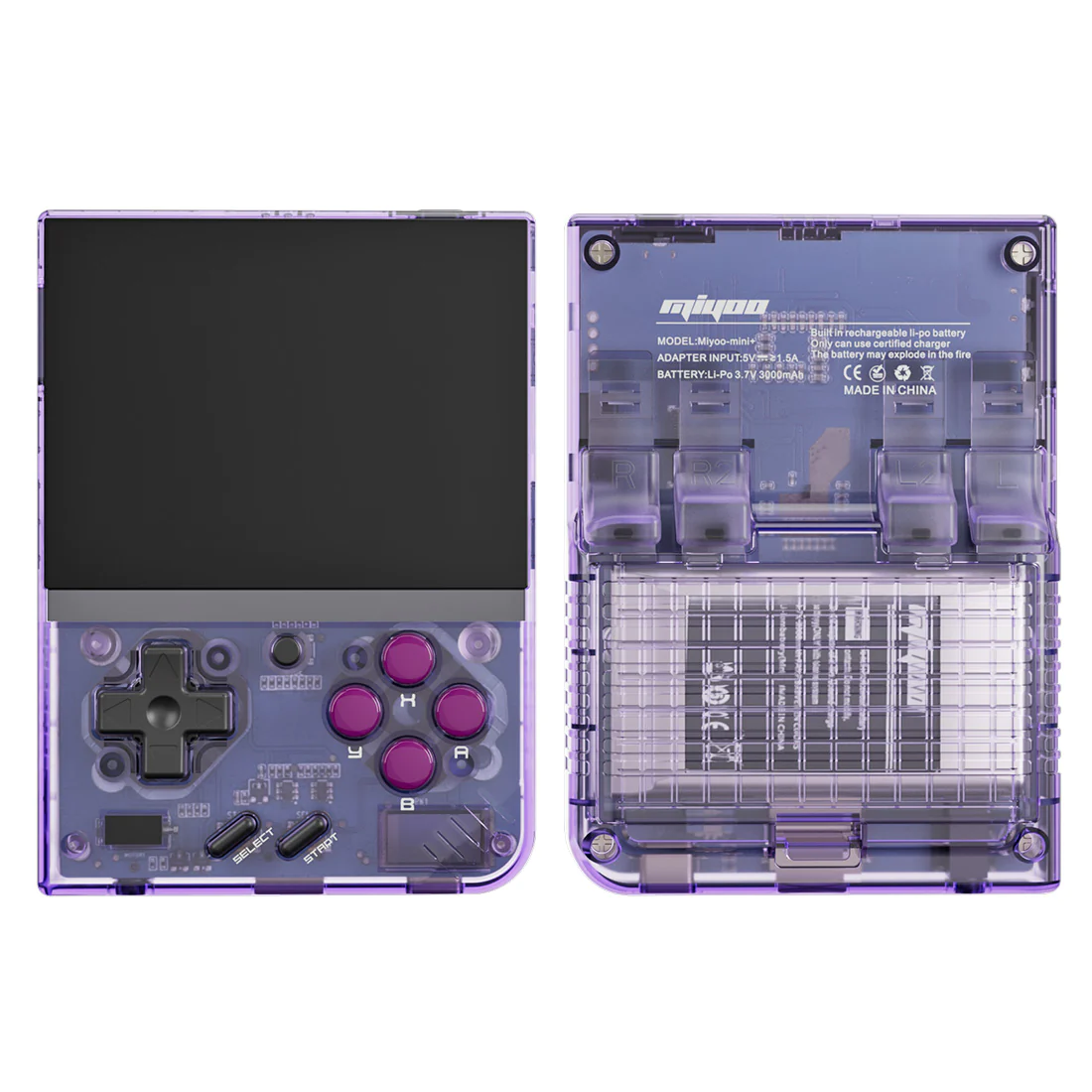
Miyoo Mini Plus
3.5" IPS, 128 MB RAM, ultra-compact vertical slab
Image: Miyoo
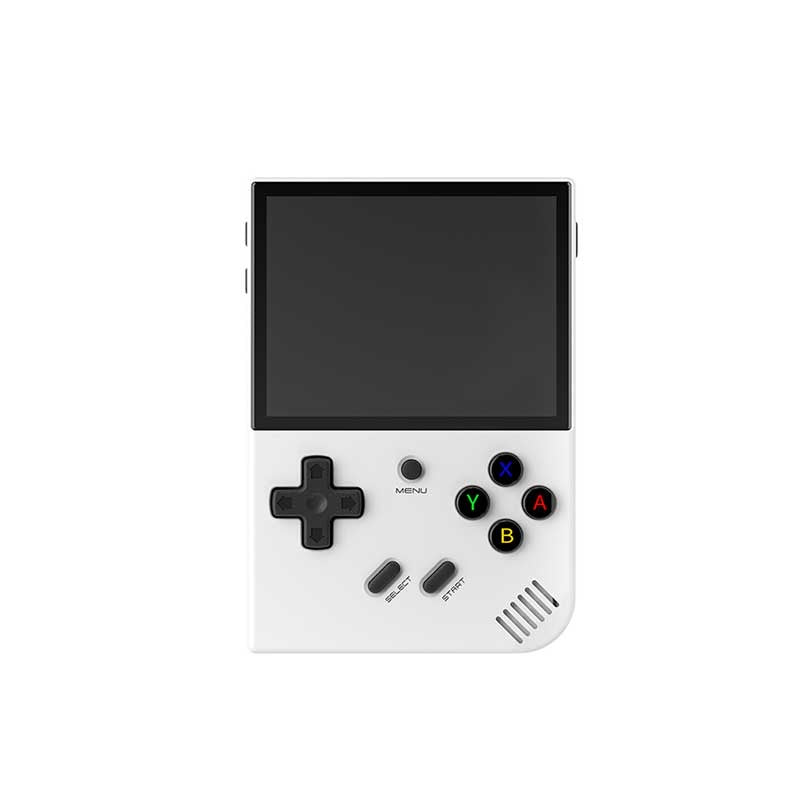
Anbernic RG35XX Plus
3.5" IPS, 1 GB RAM, horizontal form factor with HDMI out
Image: Anbernic
Specifications side-by-side
| Spec | Miyoo Mini Plus | Anbernic RG35XX Plus |
|---|---|---|
| SoC | SigmaStar SSD202D (dual-core Cortex-A7 @ 1.2 GHz) | Allwinner H700 (quad-core Cortex-A53 @ 1.5 GHz) |
| GPU | Integrated (Mali-400 class) | Mali-G31 MP2 @ 650 MHz |
| RAM | 128 MB DDR3 | 1 GB LPDDR4 |
| Screen | 3.5-inch IPS, 640×480, 4:3 | 3.5-inch IPS, 640×480, 4:3 (OCA laminated) |
| Battery | 3000 mAh | 3300 mAh |
| Weight | 162 g | 186 g |
| Form factor | Vertical slab | Horizontal slab (Game Boy-style) |
| Dimensions | 78.5 × 108 × 22.3 mm | 117 × 81 × 22 mm |
| Wi-Fi | 2.4 GHz | 2.4/5 GHz (802.11 a/b/g/n/ac) |
| Bluetooth | None | 4.2 |
| HDMI out | No | Yes |
| Shoulder buttons | L1/R1 only | L1/R1/L2/R2 |
| Analog sticks | None | None |
| Storage | MicroSD only | Dual microSD slots, 64 GB included |
| OS out of box | MiyooCFW Linux | Anbernic Linux launcher (64-bit) |
| Price (USD) | ~$50 | ~$60 |
| Released | March 2023 | November 2023 |
The RAM gap is the most consequential row in that table. 128 MB versus 1 GB isn’t a marginal difference — it’s the line between “can emulate PS1” and “can seriously attempt N64.”
Build quality and ergonomics
The Miyoo Mini Plus is genuinely small. At 78.5 × 108 mm and 162 g, it disappears into a jacket pocket in a way no Anbernic horizontal slab can match. The vertical form factor is divisive — some find it perfectly natural for Game Boy-style play, others find it cramped for extended sessions. The D-pad is the standout: the community consistently calls it SNES-grade, and after spending time with both devices, that reputation holds.
The RG35XX Plus is a conventional horizontal slab at 117 × 81 mm and 186 g — not heavy, but noticeably larger. The Game Boy-style layout suits longer play sessions and feels more natural for PS1 titles where you’re using all four shoulder buttons. And that’s the other thing: the RG35XX Plus actually has all four shoulder buttons (L1/R1/L2/R2), whereas the Miyoo Mini Plus ships with L1/R1 only. If you plan to play any PS1 game that uses L2/R2 — Ape Escape, Gran Turismo, any dual-analogue title — the Miyoo’s layout forces awkward remapping.
One known quirk on the Miyoo Mini Plus: some units exhibit screen wobble. The community fix involves B-7000 adhesive or double-sided tape and is well-documented, but it’s annoying to deal with on a brand-new device. The RG35XX Plus has no equivalent reported issue.
The RG35XX Plus ships with a 64 GB microSD card preloaded. Most buyers will eventually swap it for a higher-capacity card, but it’s a plug-in-and-play experience out of the box. The Miyoo ships without internal storage; you buy your own card from day one.
Screen
Both devices share the same resolution and panel size: 3.5-inch IPS at 640×480, 4:3 aspect ratio, 228 PPI, 60 Hz. On these numbers alone you cannot pick a winner.
Where they diverge is lamination. The RG35XX Plus uses OCA full lamination, which eliminates the air gap between the glass and the display panel. The result is a screen that feels like you’re touching the pixels, with less internal reflection. The Miyoo Mini Plus lacks this — in a dark room it’s hard to notice, but in bright daylight the difference is visible.
For GBA and SNES content both screens display a clean, sharp image at native or 2× integer scale. The 4:3 aspect ratio is a natural fit for most retro content, adding only small pillarbox bars for GBA’s native 3:2 output.
Emulation performance
The hardware gap between these two devices creates meaningfully different emulation ceilings, despite the identical screen.
Miyoo Mini Plus — emulation performance (OnionOS)
- NES — FCEUX / NestopiaFull speed Perfect
- SNES — Snes9xFull speed Perfect
- GBA — mGBAFull speed Perfect
- PS1 — PCSX ReARMedFull speed Perfect
- Nintendo DS — DraStic (OnionOS 4.3+)Variable Choppy
- N64 — Mupen64PlusNot practical Broken
- Dreamcast — FlycastNot supported Broken
Anbernic RG35XX Plus — emulation performance (muOS / Knulli)
- GBA — mGBAFull speed Perfect
- SNES — Snes9xFull speed Perfect
- PS1 — PCSX ReARMedFull speed Perfect
- N64 — Mupen64Plus-NextPlayable (game-dependent) Playable
- Dreamcast — FlycastPlayable (selective library) Playable
For the systems both devices share — NES through PS1 — performance is equivalent: full speed, no compromises. The Miyoo Mini Plus’s 128 MB RAM is not a handicap at this level. The gap opens the moment you go beyond PS1. N64 is genuinely playable on the RG35XX Plus for a reasonable portion of the library; on the Miyoo, it’s not worth attempting. Dreamcast is similar — selectively playable on the RG35XX Plus, off the table entirely on the Miyoo.
One nuance on the Miyoo: OnionOS 4.3 added native Nintendo DS support via DraStic. Many 2D and lighter DS titles run, but heavy 3D titles — Pokémon games with complex overworlds, for instance — do not cope well on the hardware. The RG35XX Plus handles DS more reliably given the RAM headroom.
Firmware and software
This is where the two devices take completely different paths.
The Miyoo Mini Plus runs OnionOS, and there’s almost no reason to use anything else. OnionOS is a purpose-built, actively developed custom firmware for the Miyoo Mini family exclusively. Version 4.3 (stable as of early 2026) added DS emulation via DraStic, a PICO-8 port, screen recording, VNC remote control, and a per-game activity tracker. The community theme ecosystem is extensive, RetroAchievements is supported, and the installation process (SD card flash, ~20 minutes) is genuinely beginner-friendly. If you buy a Miyoo Mini Plus and don’t flash OnionOS within the first hour, you’re doing it wrong.
The RG35XX Plus has a wider firmware ecosystem: muOS (BANANA build), Knulli, GarlicOS, and MinUI are all officially supported. muOS is the mainstream recommendation — clean UI, RetroArch integrated, beginner-friendly, with overclocking support. Knulli is a Batocera fork that adds PortMaster out of the box (Stardew Valley, Celeste, DOOM as native Linux ports) and OTA updates. Both support RetroAchievements and game scraping. Installation takes roughly 30 minutes and two SD cards is the recommended setup for muOS.
The practical difference: OnionOS is a single definitive answer for the Miyoo. The RG35XX Plus benefits from having options, but requires you to pick — which can be a mild paralysis problem for new buyers.
Value and buyer notes
At ~$50 for the Miyoo Mini Plus and ~$60 for the RG35XX Plus, neither device will hurt your wallet. The $10 gap is not the deciding factor here — the question is what you get for either price.
The RG35XX Plus ships with a 64 GB microSD card included, which partially offsets the $10 premium. The Miyoo ships with nothing — add the cost of a quality 128–256 GB card to your budget from day one.
Warranty reality across both: cross-border warranty claims are effectively non-existent. Anbernic will sometimes respond to email support; Miyoo less so. Factor the device cost as a full write-off if it fails outside of a return window. Most don’t.
Who should buy which
Pros
- + Ultra-compact 78.5 × 108 mm body — genuinely jacket-pocket portable
- + Best-in-class D-pad for 2D fighting and platformer games
- + OnionOS is the definitive, polished firmware — no decisions required
- + Lighter at 162 g for longer handheld sessions
- + Slightly lower price at ~$50
Cons
- − Only L1/R1 shoulder buttons — PS1 games needing L2/R2 require remapping
- − 128 MB RAM hard-caps emulation at PS1; N64 and Dreamcast not viable
- − No Bluetooth, no HDMI output, 2.4 GHz Wi-Fi only
- − No internal storage — you must buy a microSD card separately
- − Some units have screen wobble out of the box
Pros
- + Allwinner H700 with 1 GB RAM opens N64 and Dreamcast emulation
- + Full L1/R1/L2/R2 shoulder buttons — PS1 library plays as intended
- + HDMI output for TV play
- + Dual-band Wi-Fi (5 GHz) and Bluetooth 4.2 for wireless controllers
- + Dual microSD slots; 64 GB card included out of the box
- + OCA-laminated screen with better outdoor visibility
- + Multiple mature custom firmware options (muOS, Knulli, GarlicOS)
Cons
- − Heavier at 186 g and larger at 117 × 81 mm — less pocketable
- − No analog sticks limits N64 usability even when performance allows
- − Firmware choice can be overwhelming for new buyers
- − Stock Anbernic launcher is worth replacing immediately
For most buyers the RG35XX Plus is the stronger long-term purchase. The extra RAM, the complete shoulder button layout, and HDMI output make it more versatile without a painful cost increase. If your entire retro library lives between NES and PS1 and you care deeply about carrying something that disappears into your pocket, the Miyoo Mini Plus is the better answer — and its D-pad will genuinely make you happier playing Street Fighter II or Super Metroid. The RG35XX Plus’s D-pad is fine; the Miyoo’s is something you notice.
The one scenario where the Miyoo wins even for a mixed-platform player: you already own another device for N64 and Dreamcast, and you want a dedicated pocket machine for 16-bit gaming. As a single-purpose device, nothing at this price point beats it.